I have an HP omnibook 5 with a snapdragon X-Plus. I installed zulu open jdk 21 for arm on it, which works well. I then installed scala using the following commands:
Now, scala repl works. That’s great. But neither scala-cli nor cs works. When I run those, I get the following errors:
This version of C:\Users\xxxx\AppData\Local\Coursier\data\bin\.cs.aux.exe is not compatible with the version of Windows you are using. Please check your computer’s system information and then contact the software publisher.
This version of C:\Users\xxxx\AppData\Local\Coursier\data\bin\.scala-cli.aux.exe is not compatible with the version of Windows you are using. Please check your computer’s system information and then contact the software publisher.
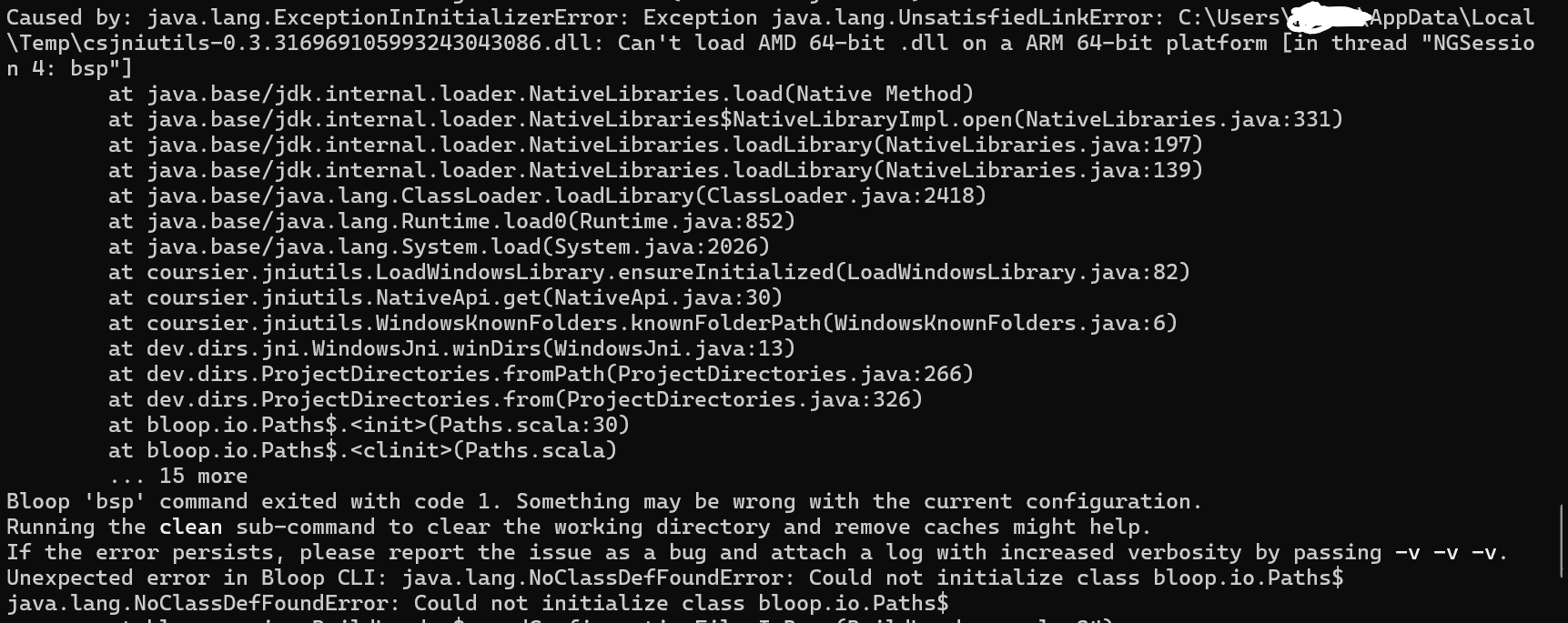
And when I run “scala run file.sc” I get the following error:
I once talked to Scala Native maintainer about some of my issues with Windows ARM. From what I understand: nobody has Windows ARM in the team, they can only test via GitHub actions and they are overloaded with other work, so Scala on Windows ARM is not actively supported by anyone. Apparently any issue on Windows takes a lot of time to investigate compared to other platforms, and only Intel get the attention due to market share.
That being said, when we last evaluated theoretical, even minimal support for Windows ARM, even GitHub Actions weren’t an option (the runners for OSS weren’t available yet), so I guess it’s not impossible to have another look.
However, it is still a very niche target platform, so I’m not entirely sure.
Scala CLI native images (including Windows ones) are built with GraalVM, which has no present nor planned support for Windows ARM.
So currently your best bet is to use a JVM launcher.
Thanks for the answers! Good to know, even if what you said weren’t what I’d hoped for.
For others in my situation: Since scala does actually work on arm if installed as i specified, I actually figured out a work-around to run scripts:
scala run script.sc --server=false
This works because bloop (the default compilation server or something) only works on x86, and therefore turning it off and compiling from the beginning every time fixes the errors.
In summary, I can use the command scala and the command coursier just fine on arm. But I cannot use scala-cli or cs. I thought scala was scala-cli though, and coursier was cs. I don’t really understand. But right now I can run my files with --server=false, so I’m happy for now.
Getting VS Code and Metals working is a completely different story…
scala is a wrapper script around scala-cli.
As Windows ARM is an uknown platform for the installers, I suspect scala gives you the JVM launcher I mentioned earlier, since if I recall, that is the default for niche, otherwise unsupported platforms.
Under scala-cli you likely have the GraalVM native image for Windows, which wouldn’t work on ARM.
Can’t say about cs, but I suspect it’s similar (and Coursier also includes a JVM launcher in its GitHub releases).
I think the only issue might be with downloading Metals if coursier fails. There might be a problem also if you have scala-cli on PATH, which we will pick automatically. You can use `metals.scalaCliLauncher` to change that.
I have metals successfully installed. But it doesn’t seem to work. At some point I managed to press “run” in VS Code with metals and it actually ran the scala program, but it only worked sometimes. And now I can’t seem to get it to work at all anymore.
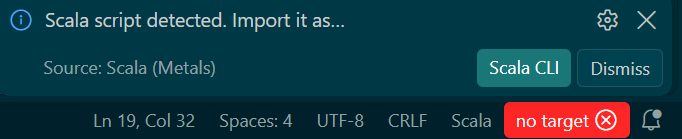
With scripts (.sc files) Code now asks the following (after a long while of “importing…”):
When I click “Scala CLI”, and confirm, nothing at all happens. The red “no target” in the down right corner remains. Nothing happens when I press that, either.
When I press ctrl + f5, to run the program, the following shows up:
Any idea why? To repeat what I said earlier, my coursier installation is bugged; “scala” works in cmd but “scala-cli” and “cs” don’t work at all.
There might be more information in .metals/metals.log file. Ideally you can open up an issue with that file and we can continue on Issues · scalameta/metals · GitHub